
The control nobody works around.
Dedicated PAM is the deepest way to govern privileged credentials. Its hard part is coverage — what never gets onboarded, and what people route around once it is. MisterShell aims at the same estate from the other end: make the convenient path the governed one. Here’s an honest look at where each fits.
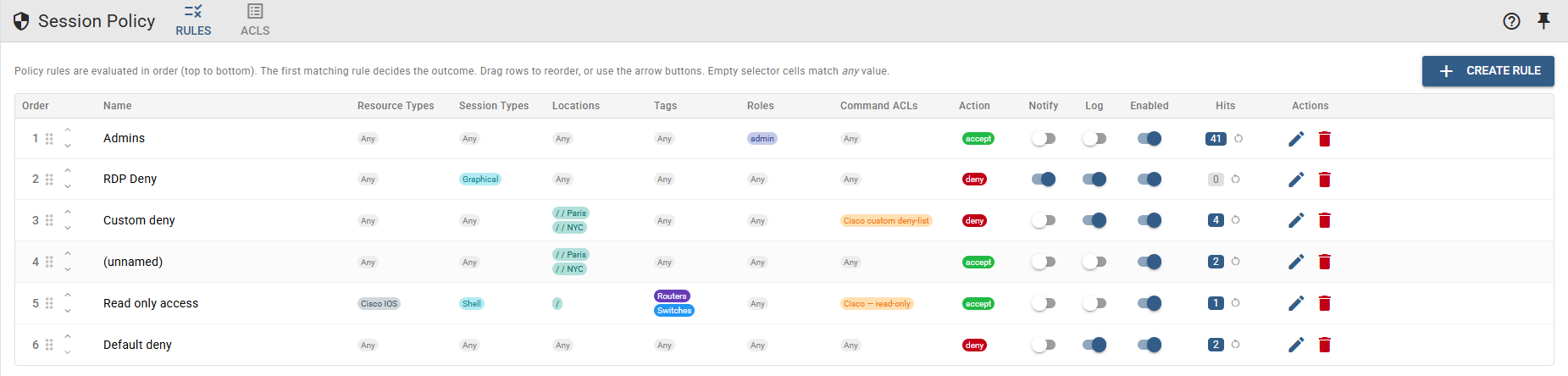
One platform, the essentials in one place
MisterShell covers the privileged-access essentials — firewall-style session policy and per-command ACLs, approval gates before sensitive targets, an encrypted store for service account credentials plus a personal and team vault for people’s own logins, full recording and replay held as immutable operational evidence in an object store you own, RBAC/SSO with authenticator-app MFA, and syslog/CEF audit to your SIEM — in the same self-hosted platform as the daily work: governed access, health and configuration tracking, event-driven automation, and AI held to the same guardrails as people, its actions audited to the same SIEM. And it is deliberately the easiest way in rather than a detour around one: engineers keep the terminal they already use, and the automation accounts that never got onboarded anywhere else — the config-backup job, the monitoring poller, the Ansible run — reach devices through the same door, under the same policy and record. The point is not “cheaper PAM.” It is that the governed path is also the convenient one, so coverage stops depending on everybody’s goodwill.
Where it leaves the common team short
The gap in practice is rarely the control set — it is how much of the estate ever lands inside it. A full PAM programme is a long deployment, and the things that do not get onboarded are the ones that matter most: the automation account, the config-backup job, the monitoring poller, the contractor who needed access on a Tuesday. Each keeps its own credential and its own direct path, and none of it appears in the access review, because none of it is a person. Meanwhile the engineers who were onboarded find the governed route slower than the direct one and quietly keep a way around it. A suite also governs access and stops there: it gives engineers no place to actually work — sessions across SSH, Kubernetes, databases and Windows; live health and configuration history; AI inside the session — so it rarely arrives alone, it arrives next to four other tools.
The essentials, in one platform
Remote workers, enterprise sign-in, high availability, and audit export to your SIEM come with the Pro edition; policy engines, session recording, and automation ship with Enterprise; IDS, syslog collection, and external access are licensed add-ons.
When a dedicated PAM suite still earns its place
For most teams, the essentials above cover privileged access end to end. A dedicated PAM suite — CyberArk (now part of Palo Alto Networks), BeyondTrust, Delinea, or One Identity — earns its place when you need to go deeper: automated credential rotation, check-out and secrets lifecycle, just-in-time elevation and zero-standing-privilege, endpoint privilege management, and formal compliance certifications. When governing privileged credentials at that depth is a dedicated mandate, run a PAM suite — and many teams run it alongside MisterShell, which keeps the day-to-day access, operations, and AI in one place.
Start with MisterShell when
- Coverage is your real problem — the service accounts, scheduled jobs and scripts that never got onboarded, and the engineers who route around the governed path
- You want the privileged-access essentials — policy, approvals, credentials, recording, audit — in one platform (policy, approvals, and recording with the Enterprise edition), without a multi-product suite
- You also need governed access, monitoring, config history, automation, and AI in one place
- Self-hosted with no SaaS control plane, and data that never leaves your environment, matters
- You would rather run one platform your team works in daily than integrate five
Add a dedicated PAM when
- Automated rotation, check-out and secrets lifecycle are your central requirement
- You need JIT elevation and zero-standing-privilege at depth
- A vendor compliance certification is a hard procurement gate
- You run privileged-account governance as a dedicated enterprise program
Comparison reflects publicly available information as of September 2026. Verify current capabilities with each vendor.
Get in Touch
Want a guided demo, or a trial license to evaluate Pro or Enterprise on your own infrastructure? Tell us — we'd love to hear from you.