
Privileged session monitoring built for security teams.
Firewall-style session policy, per-command ACLs, read-only admin shadowing, full recording and replay of terminal and graphical sessions, and syslog/CEF export to your SIEM. Every privileged action is attributable, reviewable, and replayable — evidence that stands up to audit, controls that stop unauthorized commands before they reach the target, and a human approval before access where you require one. Passive intrusion-detection sensors add network-layer detection alongside session-layer control.
Proving who did what — before and after an incident.
Privileged actions are hard to attribute
Even with individual accounts, access logs capture the connection — not what an operator did once inside the session. When a privileged action is questioned, the record often isn’t specific enough to settle it.
Incident investigation means reconstructing from fragments
Most teams have logs and change records, but without session replay an investigator still assembles the picture from fragments — and the timeline is only as complete as what each source happened to capture.
Least-privilege is a goal, not an enforcement
Broad accounts persist because fine-grained, per-engineer, per-resource grants are slow to provision and maintain. The result is more standing access than anyone wants — and it’s hard to walk back once it’s in place.
Auditors want evidence, not policy documents
Compliance reviews ask for proof: who accessed what, when, and what they did. Policy documents describe intent. An audit trail with replay delivers the evidence.
Controls that enforce least-privilege and evidence that proves it.
MisterShell applies firewall-style session policy and per-command ACLs at every privileged session — so unauthorized commands don't reach the target — and, where a resource warrants it, requires a human approval before access is granted. Every action is captured in a durable per-command audit trail with full session replay, exportable to your SIEM. Security teams get controls and evidence in one self-hosted platform.
Detect threats at the network layer — not just the session.
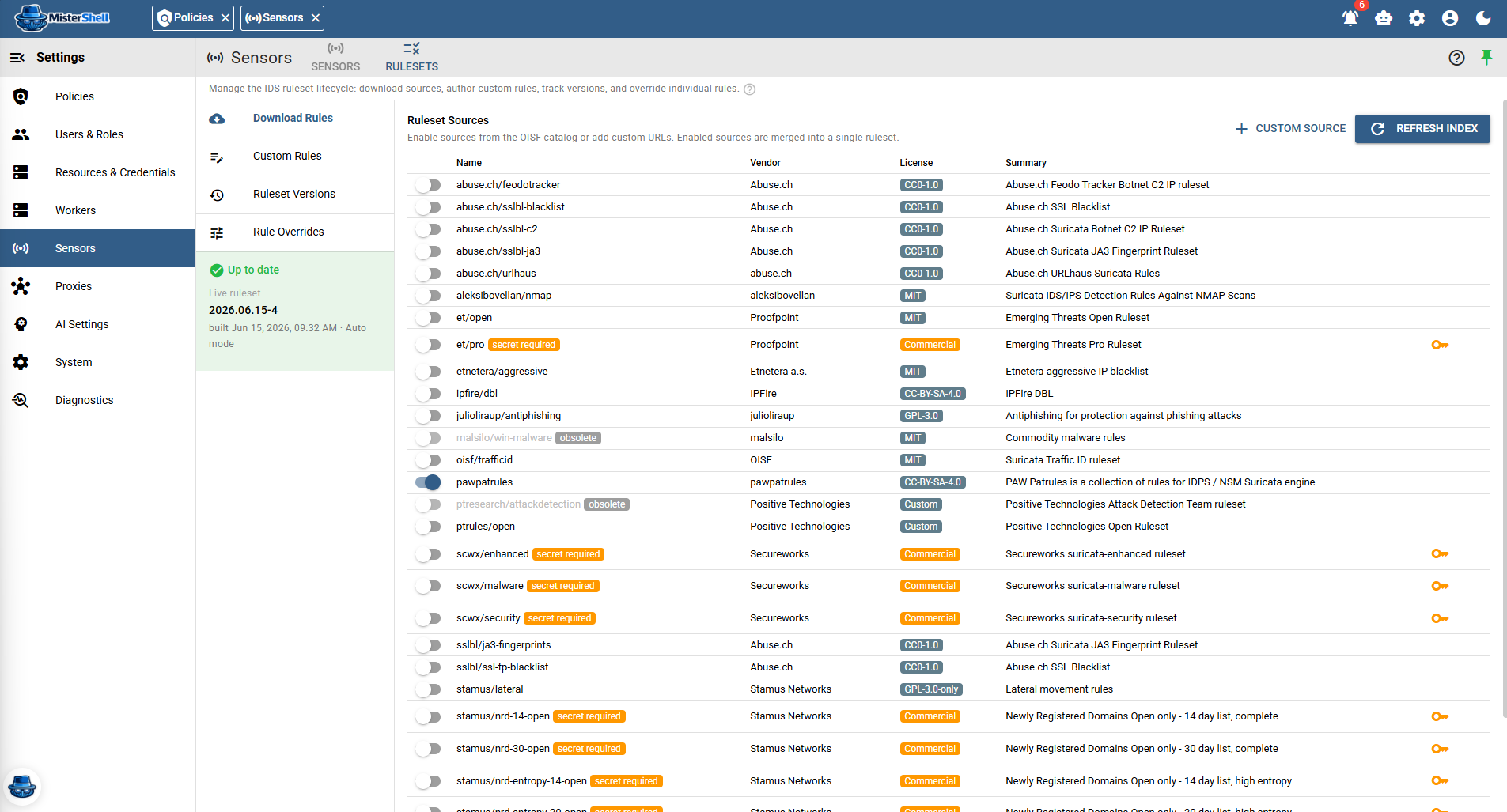
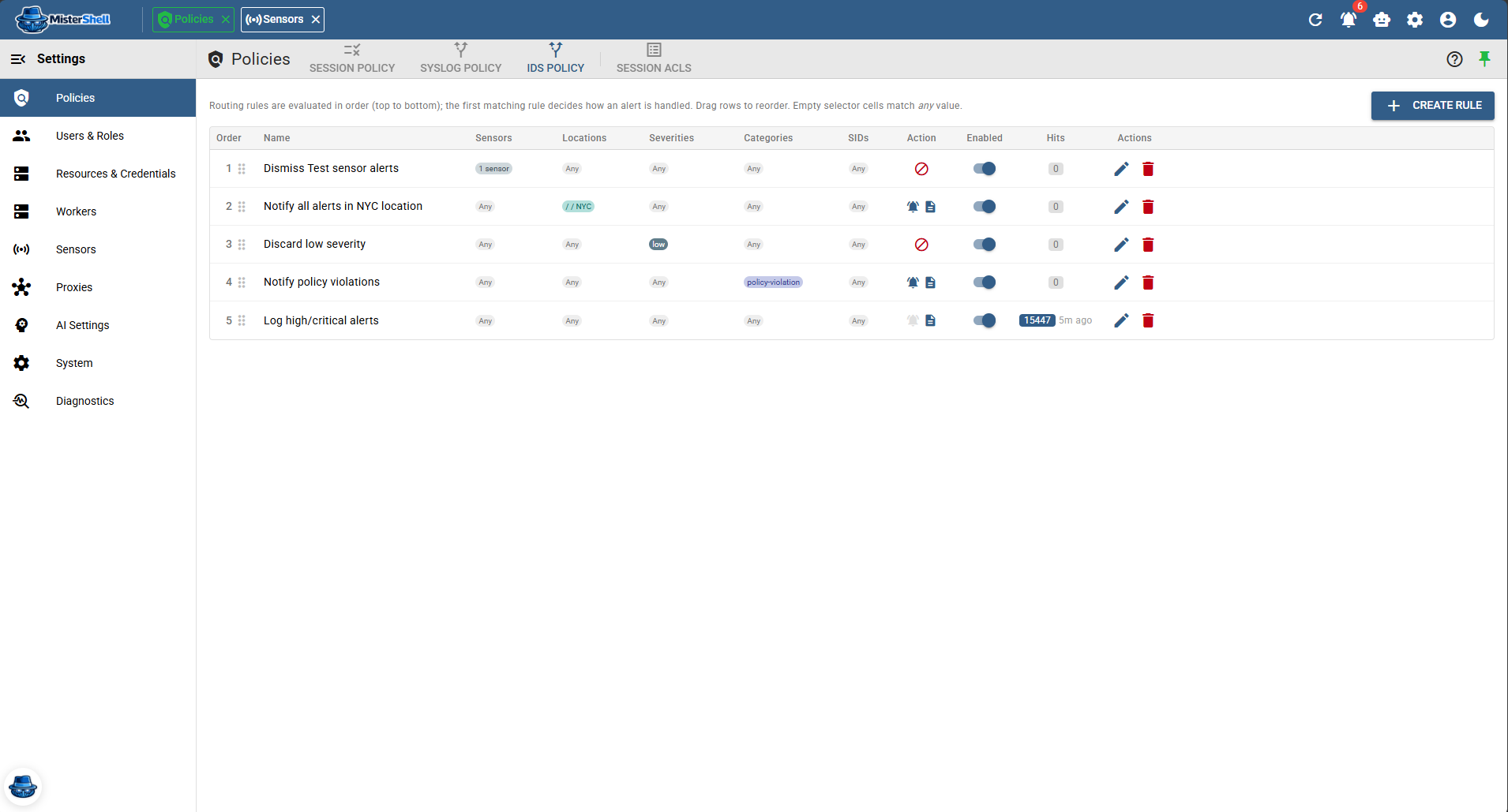
Session policy governs what privileged users can do. Passive intrusion-detection sensors cover what those controls can't see: traffic on the wire. Deployed at the locations you choose, sensors watch network traffic and raise alerts — always in detect mode, never in the data path. Detection runs on curated, industry-maintained rule sources you select and keep current — extended with your own custom rules and per-signature overrides, and built into versioned rulesets you can roll back — while an ordered alert policy lets you suppress the noise, notify on what matters, and forward the rest to your existing tooling. When an alert involves a managed resource, it's linked to that resource automatically — so a network signal lands in context, not in a separate silo.
Licensed feature — sensor capacity is set by your license.
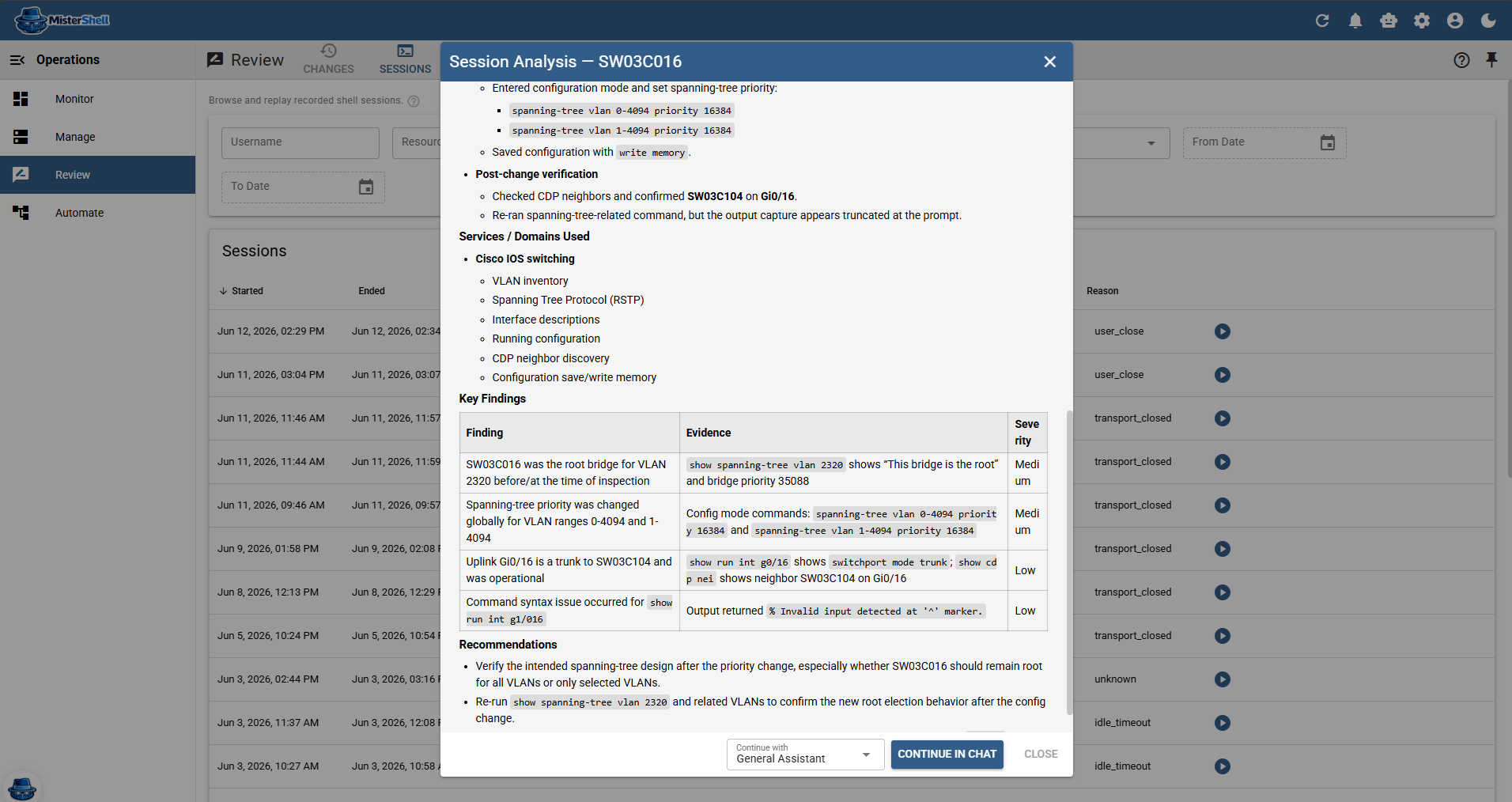
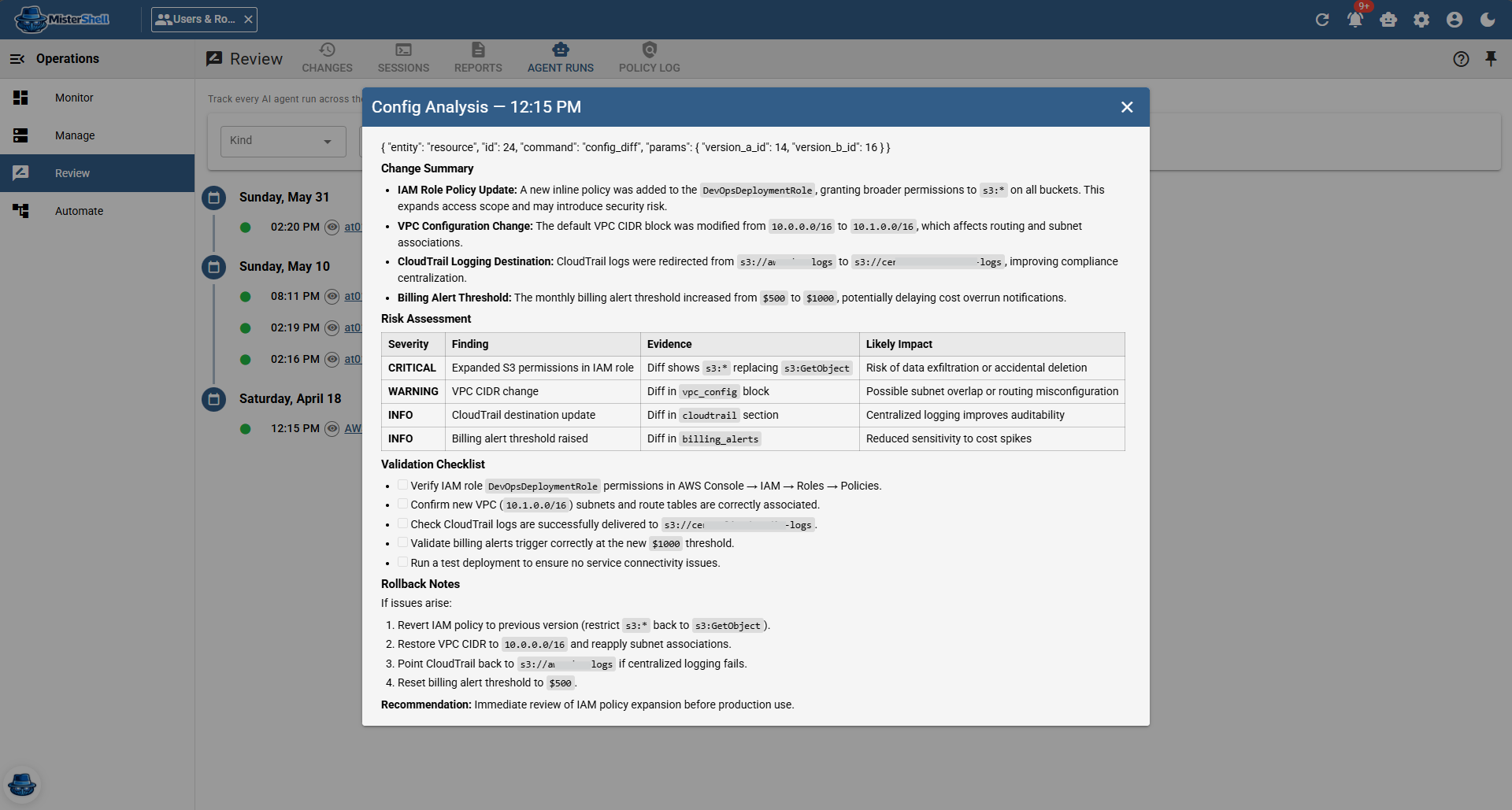
Recordings and changes are only as good as who reviews them.
A small team cannot watch every session or read every configuration diff, so most are never reviewed. MisterShell lets you wire custom AI agents into automation to analyze sessions, configuration changes, and alerts as they happen — summarizing what an operator did, flagging a risky command or an unexpected change, and surfacing only what a human should look at. Each agent is constrained by its agent type and per-agent tool restrictions — limited to the tools you grant, with every run recorded and attributed.
Bring your own LLM. Agents run on the events and replays you choose, and what they saw and produced is itself audited.
The controls and evidence security teams need.
Remote workers, enterprise sign-in, high availability, and audit export to your SIEM come with the Pro edition; policy engines, session recording, and automation ship with Enterprise; IDS, syslog collection, and external access are licensed add-ons. See pricing.
Firewall-style session policy
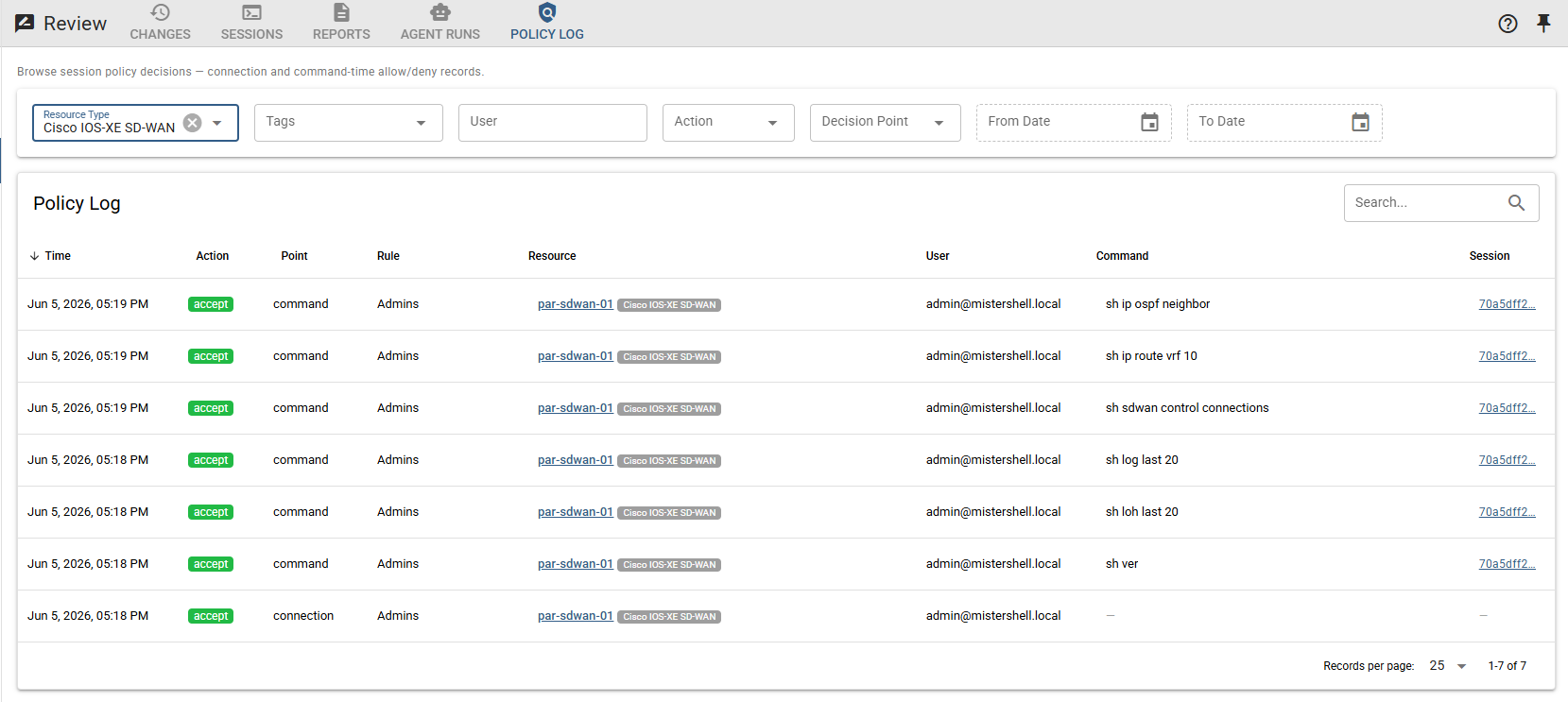
Allow/deny rules — with notify and log flags — evaluated at connection time — by location, resource type, tag, role, or session type — and per command, by glob or regex. Unauthorized commands don't reach the target.
Per-command ACLs
Reusable named command allow/deny sets, with built-in database read-only and mutating SQL sets to start from. This is more than pattern matching: a command line is taken apart before it is judged, and every part of it has to be allowed on its own — chaining a blocked command onto a permitted one does not slip it through, and neither does reformatting or padding it. Author your own sets per environment, with scoping carried on the policy rules — least-privilege enforced at the command level, not just the role level.
Approval before access
For the resources that warrant it, a policy rule can require a human decision before a session opens or a file transfer starts. The roles you name approve, the access expires on its own, and every request and decision is kept as evidence — even after the rule that produced it is edited or removed. Part of policy, in the Enterprise edition.
Read-only admin shadowing
Join any active session as a read-only observer for live oversight — without taking over the session. Security and compliance reviewers can watch privileged actions in real time.
Full session recording and replay
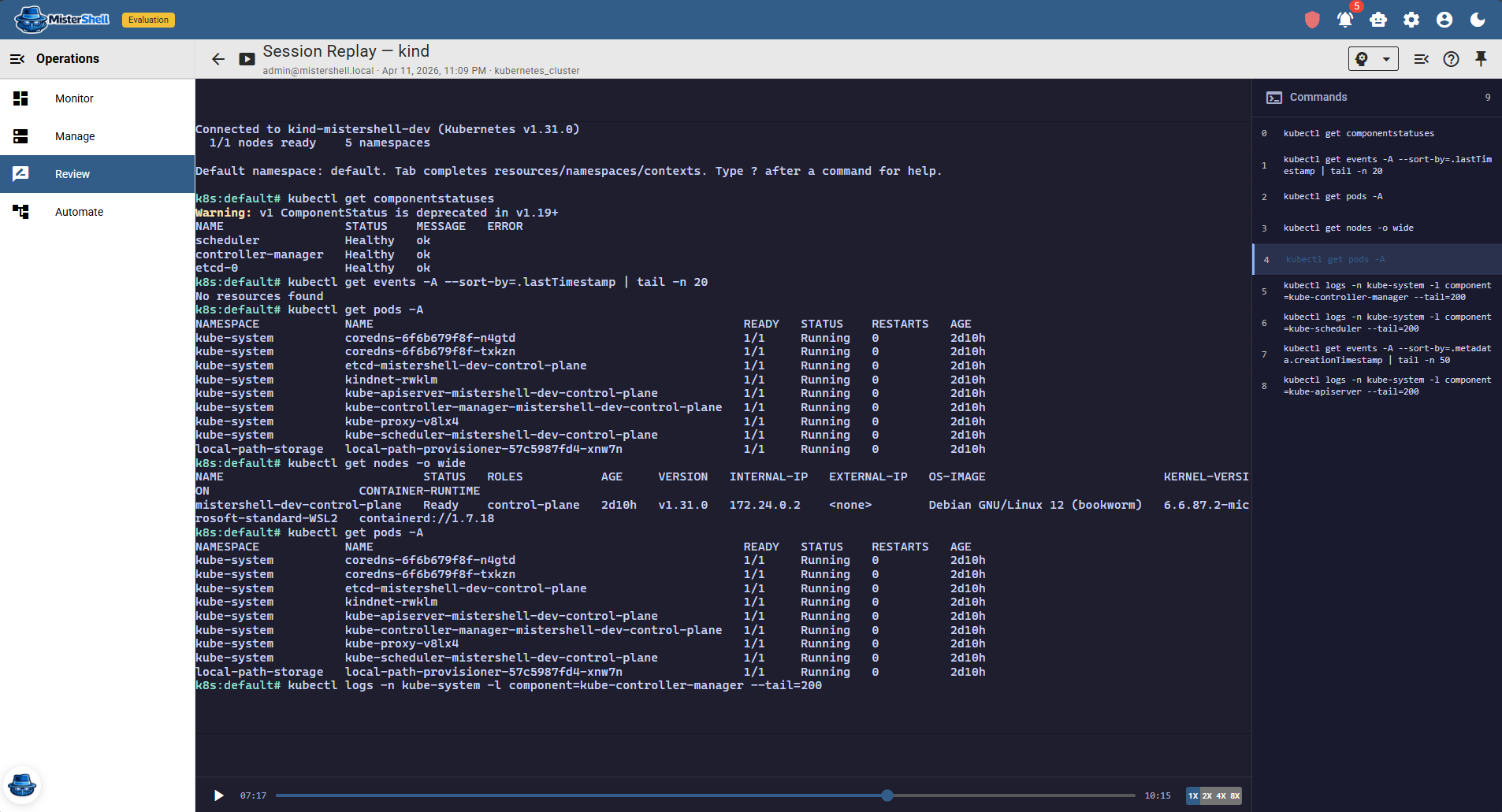
Terminal, RDP, VNC, and web-app sessions are all recordable and replayable under your Recording Policy, backed by your own object store (local, S3, or Azure Blob). Each recording is SHA-256 hashed at capture, the hash held apart from the recording, and replay verifies it — so you can show it has not been altered since. Replay the exact sequence of commands, output, and desktop actions for a recorded session — no reconstruction required. Recordings are immutable operational evidence: deleting a resource, user, or worker never deletes them, and replay flags any detected gap as partial. In a clustered deployment, recordings replicate across cores, so a captured session stays replayable even if the core that hosted it fails mid-session.
Durable per-command audit trail
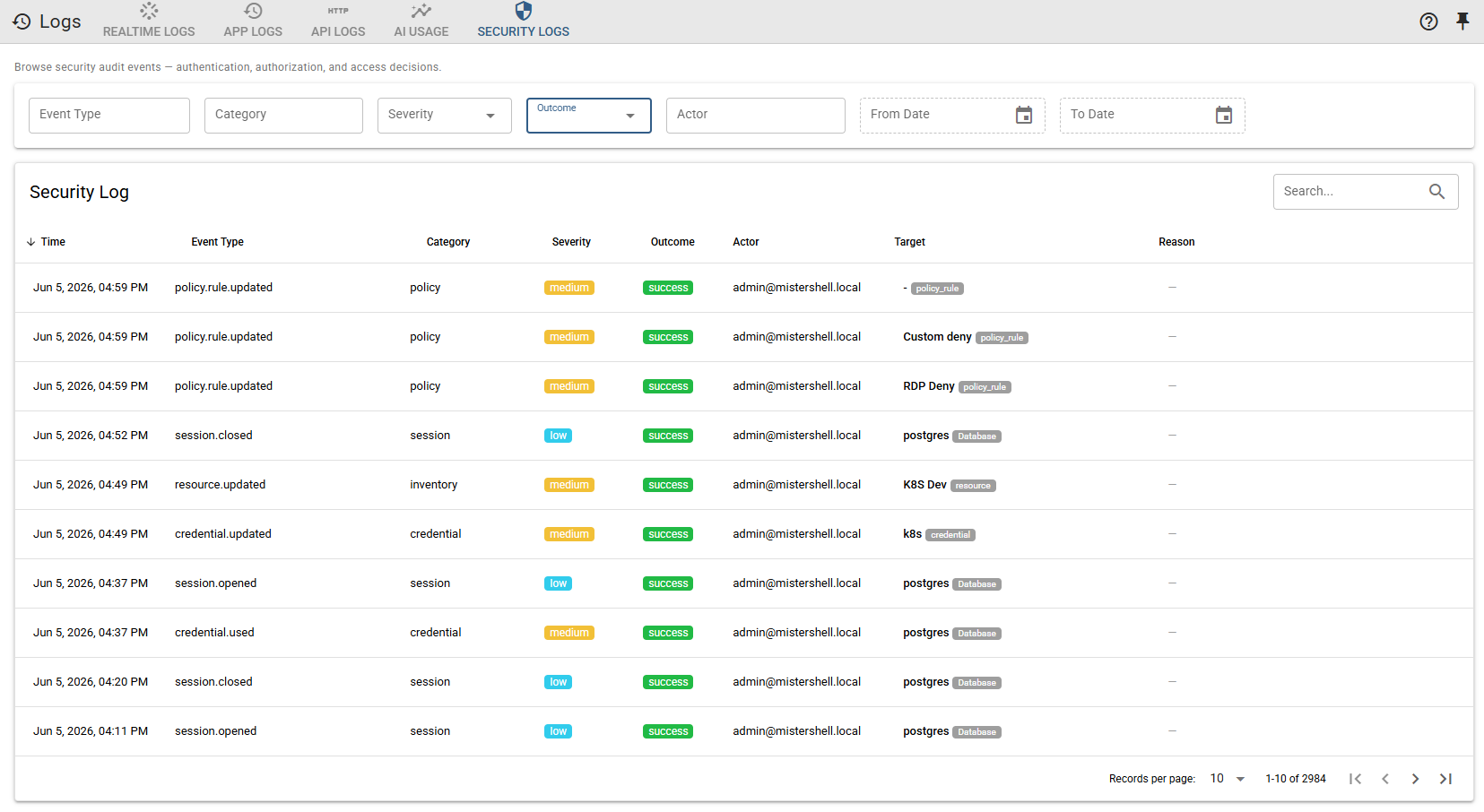
Recorded sessions carry a command timeline, and policy decisions are logged per rule — a durable trail attributable to an individual, not a shared account, and the foundation for incident timelines and access reviews. Access requests and their decisions leave evidence of their own, and every AI action and tool call — external agent platforms included — is correlated into one attributable AI audit trail beside them.
Operational compliance, continuously verified
Fact Policy turns collected facts into continuous compliance checks — declare an operational intent (NTP synchronized, an approved software version running, an expected route present) and every in-scope resource is verified against its actual state on each snapshot. A pass/fail compliance heatmap tracks posture over time at fleet, location, and resource scope, and a status change can raise an automation event and a security-log entry to your SIEM — continuous control monitoring, not a point-in-time spreadsheet.
Syslog/CEF export to your SIEM (Pro edition)
Security audit events export to your SIEM via syslog/CEF or webhook — the AI, Security, Policy, API, and App streams, all in a standard format your existing tooling can ingest.
Enterprise authentication & location-scoped RBAC
Single sign-on through your enterprise IdP — LDAP, OIDC, or SAML — with multi-factor and conditional access enforced by the provider — and authenticator-app or email MFA, plus password requirements, for local and LDAP sign-in. Sign-ins end after a maximum duration you set, and API and SSH keys expire within the lifetime limits you set. Directory-group-to-role mapping automates the access lifecycle (OIDC and SAML providers can take group membership from LDAP), and location-scoped RBAC controls who can see, use, or administer sessions per environment. A credential can require each person's own login, so the target sees the same individual the audit trail does.
AI under AI Guardrails
The in-session AI assistant operates under AI Guardrails: read-only by default, per-resource-type allow-list of permitted actions, and AI actions attributed and audited. AI capabilities do not bypass session policy — the operator stays in control. External agent platforms can act too, signing in as a named user through your own identity provider and getting exactly that person's permissions (Pro edition).
Access and session policy as code via Terraform and GitOps
Define access declaratively with the official MisterShell Terraform provider or the REST API — credentials, roles and role grants, and the session policy rules and per-command ACLs themselves — so a change to who may reach what, or to what they may run, arrives as a reviewed pull request with every change attributable. Recording, fact and config policies stay in the UI for now. The built-in MCP endpoint adds read-only context and diagnostics for your AI tooling.
Highly available by design
When MisterShell is the governed way in, the access path can't be a single point of failure. Deploy it active/active — multiple cores serving traffic in one region, or across regions — so losing a node never locks your team out of the infrastructure they need to reach, and never interrupts the audit trail. Multi-core high availability comes with the Pro edition.
Mapping MisterShell to SOC 2, ISO 27001, NIST 800-53, PCI DSS, or CIS?
See the control mappingGovernance holds because everyone actually works here.
MisterShell earns its place with operators first — which is exactly why the controls you need are never the bottleneck.
The convenient path is the governed path
Operators choose MisterShell because it makes their work faster — browser access, AI troubleshooting, one place for everything. So you get audit coverage without chasing shadow access: the tool they want to use is the one that records every action.
One policy model, every team, every resource
Network, servers, Kubernetes, and databases are governed by the same session policy and command ACLs you author — and file transfers by a File Transfer Policy of the same shape, approvals included. Set a rule once and it holds for every team — human or AI agent.
Detection and response on live events
IDS alerts, risky sessions, config changes, and compliance violations can trigger event playbooks that run an AI analysis or notify you — the investigation starts before you open the ticket.
Get in Touch
Want a guided demo, or a trial license to evaluate Pro or Enterprise on your own infrastructure? Tell us — we'd love to hear from you.